
diados
Extension of the Day

diados

5.0 FREE
  • Screenshot 1

Description

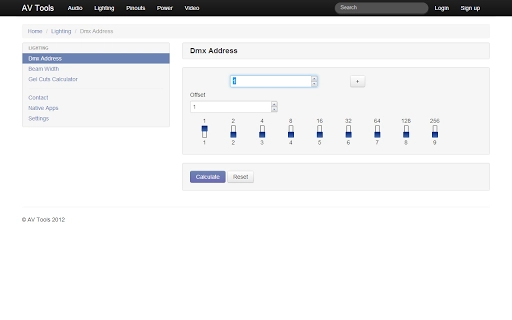
A simple but very useful collection of audio-visual tools and information for use when ever you need.Audio Tools❖ Delay calculator - A quick and easy way to convert from metres / feet to mS.❖ DAW disk space calculator - Want to know how many tracks you can record for your 30 minute master piece and at what sample / bit rate based on your hard drive capacity, then this is the tool for you.❖ SPL calculator - Simply enter amplifier power, loud-speaker sensitivity and a distance to find your maximum sound pressure level.❖ Tone Generator - Generate a sine wave between 20hz and 20khz, or white noise.❖ Impedance calculators - Calculate total loads for a group of speakers in parallel and series configurations.❖ dBu / dBV to voltage converter, wavelength calculator, constant voltage impedance converter (70v + 100v line), and UK radio mic frequency lists (Ch38, Ch69 and de-reg).Video Tools❖ Aspect ratio calculator - Need to work out a videos aspect ratio; simply enter the dimensions and press calculate, alternatively enter one dimension and select the aspect ratio to get the second dimension.❖ Projection distance calculator and screen resolutions guide.Lighting Tools❖ DMX address - dip switch - Simply enter the DMX address to receive the correct dip switch settings, then select an offset (Number of DMX channels your fixture requires) and use the plus and minus buttons to quickly address multiple fixtures.❖ Beam width calculator.Power Tools❖ Power voltage current calculator - A simple Ohm's law based calculator.❖ Voltage drop calculatorPlus❖ Pin-outs for common audio-visual connectorsAndroid App Reviews★★★★★ - "Great Audio Tools"★★★★★ - "Wao! Just what I needed. I love it! Thanks!"★★★★ - "Good information. Nice update for Celsius and Fahrenheit. Thank you."

Guides & Tutorials for AV Tools App for Chrome

How to install AV Tools App for Chrome
  1. Click the Preview / Download button above.
  2. Once redirected, accept the terms and click Install.
  3. Wait for the AV Tools App for Chrome download to finish on your device.
How to use AV Tools App for Chrome

This software is primarily used for its core features described above. Open the app after installation to explore its capabilities.

User Reviews for AV Tools App for Chrome 0

    No reviews found

Similar Apps


